AI IT Automation: Improving Internal Support and Technology Operations
Connect ticket intake, internal knowledge and approved runbooks while separating helpful recommendations from privileged changes.

AI IT automation can help an internal support team classify requests, retrieve technical knowledge and coordinate approved procedures. It should not turn an employee's natural-language request into unrestricted administrative authority. The strongest starting point is a bounded support workflow with known runbooks, clear ownership and a reliable escalation path.
Identify the work surrounding the incident
Support staff often reconstruct the same context from a ticket, device inventory, monitoring tool and documentation repository. A request may be assigned to the wrong team because its wording does not match the service catalog. Even when a relevant procedure exists, the technician may not know which version applies.
Map the initial request, information gathering, diagnosis, authorization and closure steps. Distinguish request fulfillment from incident investigation and production change. A ticket requesting access can initiate review, but it cannot itself establish that the requester is entitled to the access.
Assistance and automation are different permission levels
Classification can propose a service category, priority and assignment group. A knowledge assistant can retrieve approved troubleshooting steps with source references. An incident summary can organize observed facts and previous actions for the technician. Microsoft's IT Helpdesk template illustrates knowledge-assisted support and escalation to ticketing.
Execution needs a separate control path. A rule can create an approval task; a bounded automation can run a permitted diagnostic with limited credentials. Privilege changes, production modifications and destructive operations require the organization's designated authorization, independent of the model's interpretation.
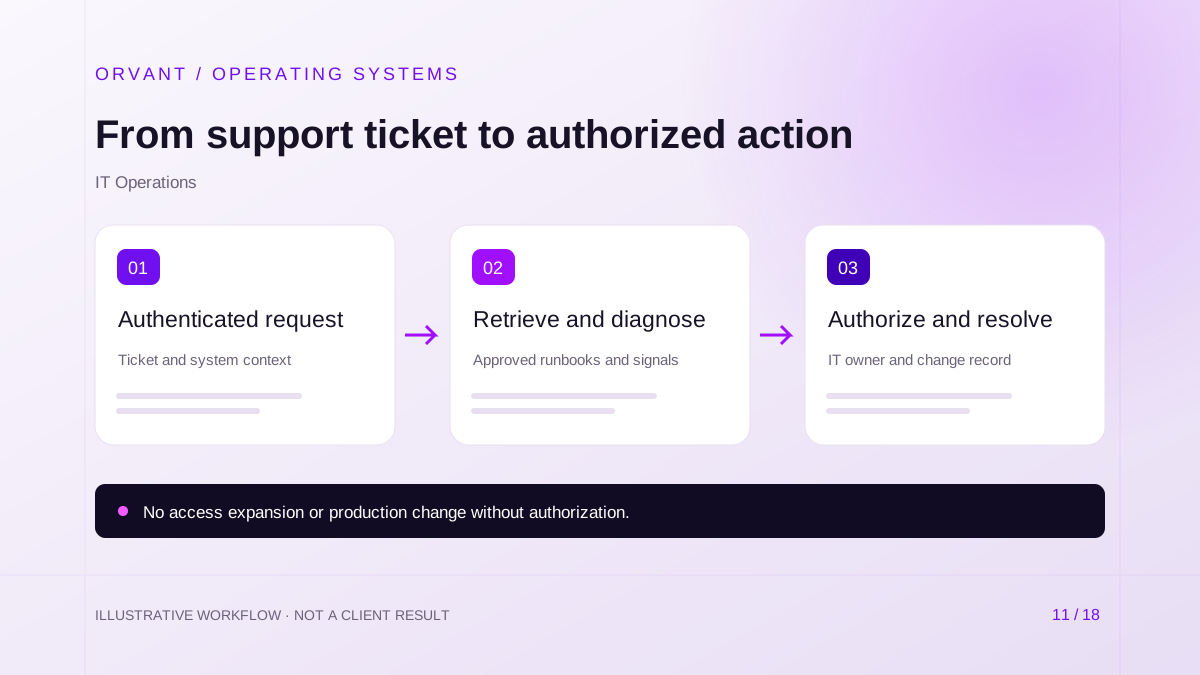
A controlled ticket-to-action workflow
- Authenticate the requester and capture the affected service, symptoms and supporting identifiers. Match the request to an existing incident or asset where evidence permits.
- Retrieve applicable runbooks and approved system signals. Suggest a classification and next diagnostic step, including the source version and missing information.
- Obtain any required approval, run the authorized procedure and record its output. Escalate failures or conflicting results to the responsible support team.
Use ITSM records as the work ledger. Correlate alert events to an incident rather than creating a ticket for every repeated signal. If the automation loses access to a dependency, leave the incident open with a clear reason instead of reporting a successful fix.
Hypothetical scenario: an internal application issue
For example, employees report that a business application is unavailable. The workflow groups related tickets, retrieves the current runbook and checks approved monitoring endpoints. It prepares a summary suggesting a common dependency for the technician to inspect.
A restart is not performed merely because it appears in a retrieved document. The designated operator checks current conditions and authorizes the applicable change. The workflow then records the action and verifies service recovery through the organization's normal process before resolving related tickets.
Knowledge, alerts and documentation
Technical documentation needs owners, versioning and applicability information. Retire old procedures from retrieval and make unavailable sources visible. An assistant should be able to say that it cannot find an approved procedure rather than generate one for a sensitive system.
Alerting workflows should specify severity, correlation rules and an on-call owner. AI can help explain groups of signals, but it should not invent a root cause. The document processing guide covers source handling, while business operations automation explains recovery from partial workflow failures.
Security and operating requirements
Define service-account scopes, secret handling, audit access and separation between diagnostic and change permissions. Treat ticket text and retrieved documents as untrusted input. A message containing instructions to reveal credentials or ignore approvals must remain data, not a command.
Budget for ITSM integration, identity controls, model usage, runbook preparation and ongoing evaluation. Confirm the required APIs and vendor entitlements. Custom enterprise software may be needed when multiple tools must share a controlled execution and approval workflow.
Evaluate a pilot without rewarding unsafe shortcuts
Choose a frequent, low-consequence support category. Test incomplete tickets, ambiguous symptoms, outdated runbooks and requests outside the user's permissions. Measure correct routing, supported recommendations, technician correction time and successful escalation.
Keep time-to-resolution alongside reopened incidents and unauthorized-action prevention. A fast answer that bypasses a required change review is not a successful outcome. Potential benefits include clearer triage and less repeated context gathering; dependable operation still requires technicians and maintained procedures.
Common questions
Should an AI assistant reset passwords automatically?
Authentication-sensitive workflows need the organization's verified identity and authorization process. A conversational request alone is insufficient. Assess the existing self-service capability before adding AI.
Can we connect every administrative tool at once?
Begin with the minimum interfaces needed for the pilot. Adding broad tool access before evaluation increases the consequences of a mistaken interpretation without proving additional value.
What should ORVANT assess?
Bring a support category, its current runbook and its ITSM and identity dependencies to an enterprise AI consultation. Define permitted assistance separately from permitted execution.
Sources and further reading
Official references checked on October 28, 2026. These describe capabilities or considerations, not results achieved by ORVANT.
- Microsoft: IT Helpdesk agent template
Example of knowledge-grounded IT assistance and escalation to ticketing.
Discuss the workflow behind your next improvement.
Bring your current process, system dependencies and operating constraints. We can discuss scope, feasibility, review controls and a practical pilot.
Discuss Your Project