AI in Human Resources: Automating Administrative HR Processes
Improve onboarding, document requests and internal answers while protecting employee information and retaining accountable human decisions.

AI HR automation is most defensible when it helps employees and administrators navigate established processes. Document requests, onboarding coordination and policy retrieval can consume substantial attention without requiring automated employment decisions. The first design task is distinguishing administrative assistance from judgments that affect a person's work, pay or opportunity.
Find the administrative burden
HR teams often coordinate the same information through an HR system, shared inbox, document repository and IT request queue. Staff repeatedly explain where to find a policy, which form is missing and who must approve an onboarding task. New employees can experience an inconsistent process because ownership is unclear between departments.
Map a small set of recurring requests, their required evidence and their designated owners. Start with current procedures and accessible policy versions. An enterprise AI implementation should make those processes clearer rather than add a second, conflicting source of HR guidance.
Useful workflows with bounded authority
- Employee-document management can classify files, check required metadata and route incomplete submissions without exposing the contents broadly.
- An internal assistant can retrieve approved policy passages and direct a person to HR when the question depends on individual circumstances.
- Onboarding can coordinate document collection, manager approvals and IT tasks, with each team retaining its own authorization.
- Training administration can send approved reminders and organize completion records without assuming that attendance demonstrates competence.
Use ordinary rules for known approval paths and due dates. AI can help interpret a free-text request, but access permissions and required approvals should remain explicit application controls.
A request-to-resolution design
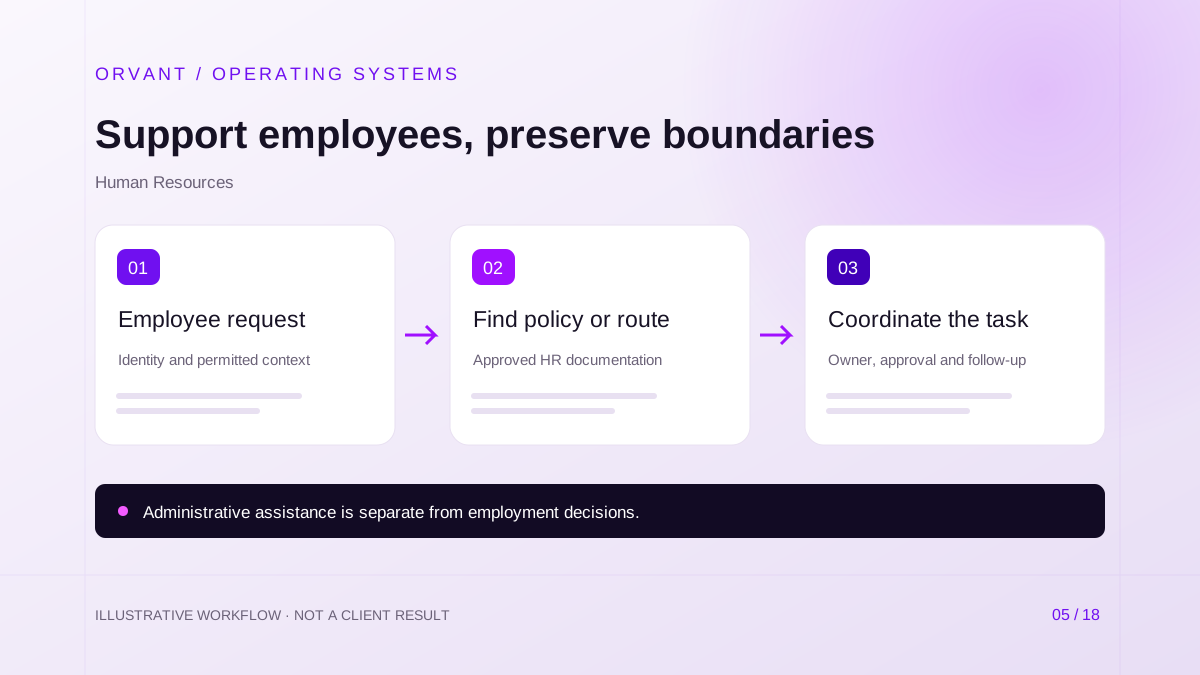
- Authenticate the requester and determine which records the role may access. Collect only the context needed for the administrative process.
- Retrieve the relevant policy version or classify the request into an approved workflow. Explain the source of an answer and flag questions that require a person.
- Create the task, approval or response through authorized systems. Record completion and follow up with the responsible owner if another department is blocking it.
A manager's access to a team roster does not imply access to every employee document. Preserve field- and document-level restrictions during retrieval, logging and reporting. The document processing guide explains how source permissions must travel with derived information.
Hypothetical scenario: onboarding coordination
For example, a company wants to coordinate an incoming employee's checklist. The workflow identifies required administrative items, sends approved instructions and creates an IT provisioning request. The manager approves equipment and the IT team applies its normal access process.
If a document is missing, the system informs the relevant administrator without distributing the document itself. It does not infer sensitive personal circumstances or automatically decide whether employment should continue. Completion reports show pending tasks and responsible teams, not a model-generated assessment of the employee.
Bias, privacy and employment decisions
Keep hiring, termination, compensation and performance decisions outside the initial administrative scope. The EEOC and DOJ guidance announcement explains that AI-based employment tools can create disability-discrimination risks. Human review is necessary in consequential processes, but its existence alone does not establish that a system is fair or lawful.
Plan for accommodation requests, contested information and confidential questions to reach a qualified person. Avoid personality or emotion assessments based on employee interactions. Have the responsible HR, legal and security teams assess the actual use case and applicable obligations rather than relying on a generic vendor compliance claim.
Requirements and continuing ownership
The project needs policy owners, revision dates, identity integration and documented retention rules. Separate employee self-service, manager reporting and HR administration. Give the team a route to correct inaccurate documents, revoke access and withdraw an outdated answer quickly.
Budget for HR-system licensing, integration work, content preparation, security review and support. Policy changes should trigger a controlled knowledge update and a regression test. IT automation can coordinate the technical portion without giving an HR assistant unrestricted provisioning rights.
Evaluate a bounded pilot
Start with one administrative request type or a non-sensitive onboarding checklist. Test common questions, incomplete inputs, outdated policies and requests for another person's information. Measure correct routing, supported answers, unresolved requests and the administrator's correction time.
Administrative reports should use clearly defined task measures, not invented productivity or employee-quality scores. Potential benefits include fewer repeated explanations and more consistent task ownership. Validate those outcomes against the baseline while including review and maintenance effort.
Common questions
Can the assistant provide individualized HR advice?
It can retrieve approved general information, but questions involving individual rights, benefits or sensitive circumstances need the appropriate human specialist. Make that handoff easy to request.
Does an HR-system connector provide sufficient permission control?
Not automatically. Check which records the connector can read and ensure the application enforces the requesting person's authority for each operation.
Where should ORVANT begin?
Discuss a documented administrative workflow, its system boundaries and its exception path. Define what the assistant must never decide before considering broader automation.
Sources and further reading
Official references checked on October 28, 2026. These describe capabilities or considerations, not results achieved by ORVANT.
- EEOC and DOJ: AI and disability discrimination
Explains risks when employment tools affect people with disabilities; this guide focuses on administration.
Discuss the workflow behind your next improvement.
Bring your current process, system dependencies and operating constraints. We can discuss scope, feasibility, review controls and a practical pilot.
Discuss Your Project