AI Document Processing: How Businesses Can Automate Information Management
A practical architecture for document intake, extraction, source verification and permission-aware retrieval across business systems.

AI document processing converts files into information that people and systems can use. It may recognize text, classify document types, extract fields, summarize passages or support semantic search. These are different capabilities, and none removes the need to validate business meaning or preserve access to the underlying evidence.
The problem is more than reading a PDF
A business document can arrive without an owner, a reliable identifier or a clear relationship to a case. Staff search folders, copy fields and ask another department which version is current. If that context is missing, better extraction alone may produce a faster but still unreliable workflow.
Start by mapping document sources, intended uses, retention and authorized readers. Decide whether the requirement is data entry, document routing, knowledge retrieval or review assistance. An enterprise AI implementation should select the components needed for that purpose rather than treat a generic document chat tool as the entire solution.
Distinguish OCR, extraction and retrieval
OCR recognizes text and layout. Extraction maps selected information into defined fields. Classification assigns a document type or business category. Google Cloud's Document AI overview describes document-processing capabilities, but their availability does not establish accuracy on an organization's own files.
Semantic search retrieves material related to a question, while a summary condenses selected content. Neither is equivalent to verifying a contract term or computing a financial amount. A retrieval answer should identify its source and version; a structured field should be checked against an agreed schema and business rules.
Build a governed document pipeline
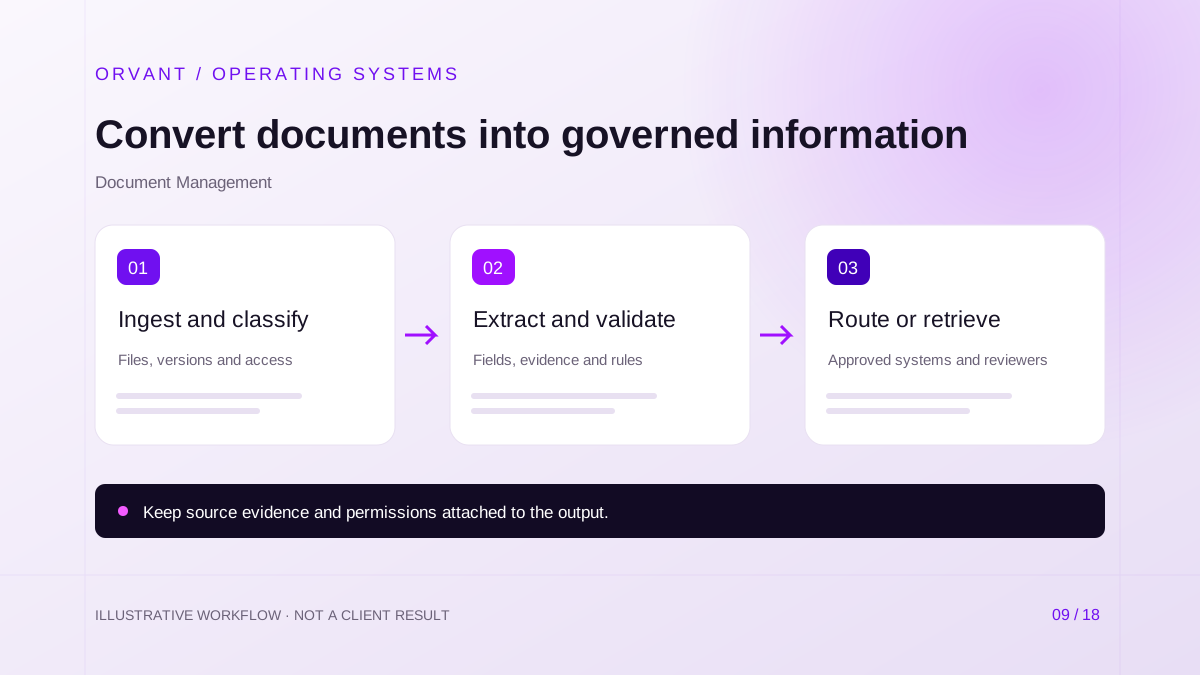
- Ingest the file, check permitted types and associate source, version and access metadata. Reject or isolate unreadable and unsupported files through a defined process.
- Classify the document and apply the appropriate extraction or interpretation step. Validate required fields, formats, relationships and source evidence before treating the output as usable data.
- Route approved output to the destination system or reviewer, preserving links to the original document. Record incomplete results and corrections instead of discarding them as processing failures.
Use stable document identifiers and deduplication across retries. A replacement upload may be a new version rather than a duplicate. Keep downstream records traceable when a correction changes information that was already used elsewhere.
Hypothetical scenario: a contract request desk
For example, a services firm wants to organize incoming contracts. The pipeline identifies the document type, proposes the parties and relevant dates, and attaches the supporting passages. Missing signatures or conflicting dates go to a reviewer.
A summary can help the reviewer navigate the file, but it must not be presented as legal advice or an approved interpretation. The professional responsible decides which terms matter and what action follows. Access to the extracted summary should be no broader than access to the contract itself.
Validate against business evidence
Field confidence is one signal, not a universal acceptance rule. Combine it with checks appropriate to the document: totals and currency for invoices, identifier matches for orders, and document completeness for a submission package. Determine acceptance thresholds using representative examples and the consequences of each error.
Keep evaluation results by document type, supplier format, scan quality and language. A good average can conceal a critical failure on a less common form. The accounting guide and procurement guide show why different departments need different validation rules.
Preserve permissions and resist document instructions
Retain access restrictions when files are indexed, summarized or copied into another system. Query-time retrieval must enforce the requesting user's authority. Hiding an original document while exposing its full summary does not preserve confidentiality.
Treat instructions found in a document as untrusted content. A supplier attachment must not tell the system to reveal other files, change its validation rules or bypass an approval. Keep tool access and consequential actions behind application-level permissions.
Requirements, costs and pilot evaluation
Prepare an annotated sample set covering ordinary documents and exceptions. Define the schema, source repository, destination interface, reviewer role and correction process. Budget for storage, extraction, model use, integration, reviewer effort and maintenance when document layouts change.
Pilot a single document family. Measure field correctness, review workload, source traceability and end-to-end completion time. Test missing pages, rotated scans, ambiguous fields and unavailable storage. Potential benefits include reduced re-entry and more discoverable information, but the system needs an operating owner after release.
Common questions
Can semantic search replace structured records?
No. Search helps find information; a governed transaction or report often requires validated fields and explicit definitions. Use the right representation for the business action.
Can every document be processed automatically?
No. Poor images, unsupported layouts and ambiguous content can require manual handling. Include that path in the design and cost model.
When does document processing become RAG?
When retrieved document content is supplied as evidence for a generated answer. The business intelligence guide explains how retrieval, calculation and access control fit together.
Sources and further reading
Official references checked on October 28, 2026. These describe capabilities or considerations, not results achieved by ORVANT.
- Google Cloud: Document AI overview
Explains OCR, document structure and extraction capabilities.
Discuss the workflow behind your next improvement.
Bring your current process, system dependencies and operating constraints. We can discuss scope, feasibility, review controls and a practical pilot.
Discuss Your Project